Shipping Profile Info
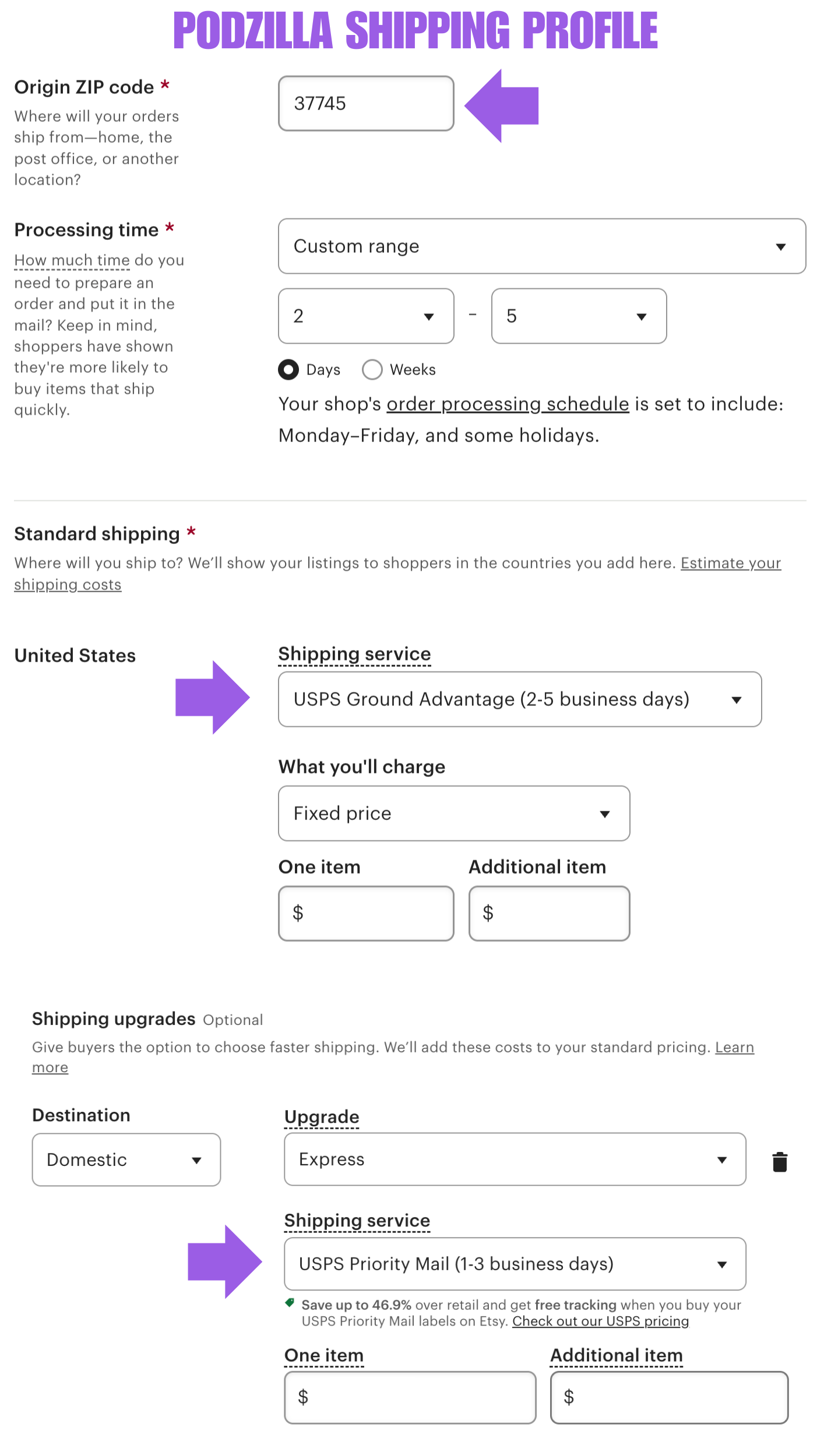
We use USPS Ground Advantage for all standard shipping. If your customers need their orders faster, Express upgrades are available. These use USPS Priority Mail, and pricing is as follows:
-
Priority Upgrade: $3.99 for the first item
-
Each additional item: $1.99
Origin Zip Code: 37745
Processing Times vary by product:
-
Most items: 1–3 business days
-
Candles: 2–5 business days
This reflects our processing time on your orders. In most cases, we ship by the next business day, unless a product needs to be reprinted due to a quality control (QC) issue.
We strongly recommend setting your Etsy shipping profiles to show a 2–5 day processing time. It might seem counterintuitive if we typically ship faster, but here’s what we’ve learned the hard way:
Why You Should Add a Processing Buffer
Q4 is wild.
Even with two full-time team members handling personalization and processing during the 2024 holiday season, we still struggled to stay caught up.
Delays can snowball quickly—whether it’s a high order volume, a customer who doesn’t respond quickly to a personalization question, or sending design previews for approval. Setting a 2–5 day processing window gives you:
-
Breathing room if you can’t approve the order the same day
-
Time to handle customer communication or personalization approvals
-
A safety net to help protect your Star Seller status
Shipping Profile Setup & Pricing Strategy
Below is a screenshot of a basic Etsy shipping profile setup.
When it comes to what you charge for shipping—there’s no one-size-fits-all answer. Many sellers use different strategies, but we lean toward simplicity.
For most products, we use flat-rate shipping. Here’s our approach:
-
Research the market – We look at top-selling listings for similar products (e.g., 20oz tumblers).
-
Calculate the average total price – That includes the item plus shipping.
-
Set our product price and shipping rate to align with that average.
-
Make sure your Priority Upgrade covers your cost – Always include at least the base rate ($3.99) in your pricing.
Related
More Articles
Getting Started
Welcome to Podzilla! The Podzilla website lets you manage products and orders associated with your shop(s). Let’s get you started.
Apparel Deep Dive: Catalog, Templates, Products & Orders
This guide walks through everything you need to know about working with apparel in Podzilla — from browsing the catalog and using the print template, to setting up products, syncing SKUs, and approving orders. It's based on Valerie's comprehensive video tutorial above, which demonstrates each step on screen.
How to Use the Candle Design Template
TRANSCRIPTThis article explains how to use Podzilla’s candle design templates, including layout...
Saving Sales with Canva Photo Cards
This customer service option has saved many of my sales! It only takes a few minutes, and is well worth it. I've included the instructional video and my script. Be sure you modify it for your brand and voice.
How to Use the 20oz & 40oz Tumblers Design Templates
TRANSCRIPTThis article explains how to use Podzilla’s Canva and Photoshop design templates for ...