Q4 Customer Service Guide🎄
Quick Reminders for Resources to Get you Through
- The Introduction to Podzilla slideshow is full of valuable information - including missing packages and order reprints - which happen more often this time of year.
-
If you’re not a part of the Podzilla discord group, get in on the action!
If you’re new to Discord, go to discord.com and sign up for an account. Then message Russ - either by sending a DM on Discord to @Russ Johnson, emailing him at russ@podzillaprints.com, or using the support chat on Podzilla. Include your Discord display name and your Discord user name.
Here’s the difference. If you hover over your name at the bottom left of Discord, the top is the display name and the bottom is the user name.
Russ will send you an invitation to join the group but it does expire after a certain timeframe, so don’t forget to check back and see if you have the invitation.
Discord is the place to keep up with:
• Product updates
• Announcements about inventory issues
• Training videos
• Live call replays
• Much more!
Plus there’s a fantastic community willing and eager to help with anything you run into!
Podzilla Holiday Shipping Deadlines - 2025
Orders approved after these dates may still make it on time, but it really depends on how backed up USPS is.
Also, these are NOT guaranteed delivery dates. These dates give us enough time to get orders processed and shipped by the USPS posted dates for their best chance to make it on time.
Where to Add Holiday Shipping Deadlines in Your Shop
-
Shop banner
-
Shop announcement
-
Thank you message sent in receipt after a customer buys.
Shop announcement and message to buyers are under Settings-> Info & Appearance -
First line in your listing descriptions.
Use the bulk edit feature on Etsy to quickly add to the beginning and remove after the holidays. -
Photo card added to the end of your listing photos.
This can be bulk edited by using the website getvela.
Plan Ahead by Creating Quick Replies in Etsy Messages
Certain topics will come up over and over this holiday season. Be prepared to answer messages quickly for the most common customer service issues by setting up Quick Replies.
- Go to your messages and click into any message.
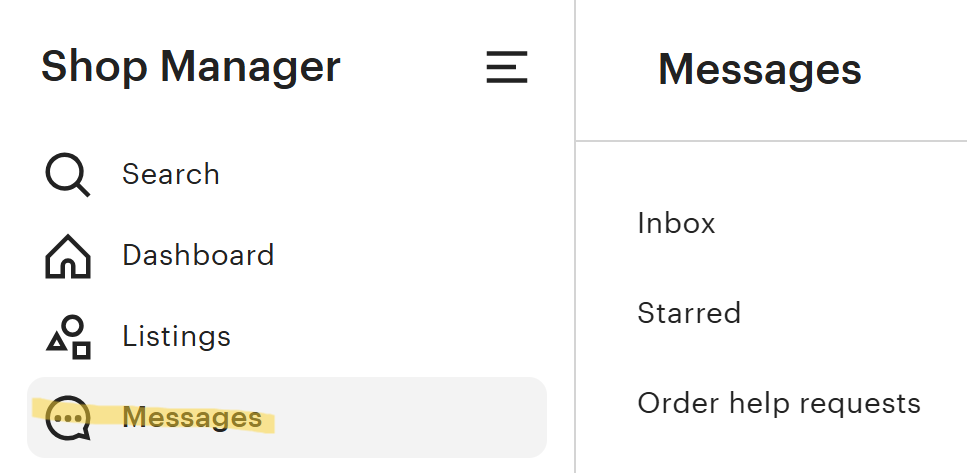
- At the bottom click the chat bubble icon.

- Over on the right under the send button click View all|Edit.

- From there click Add New at the top and select Quick Reply.
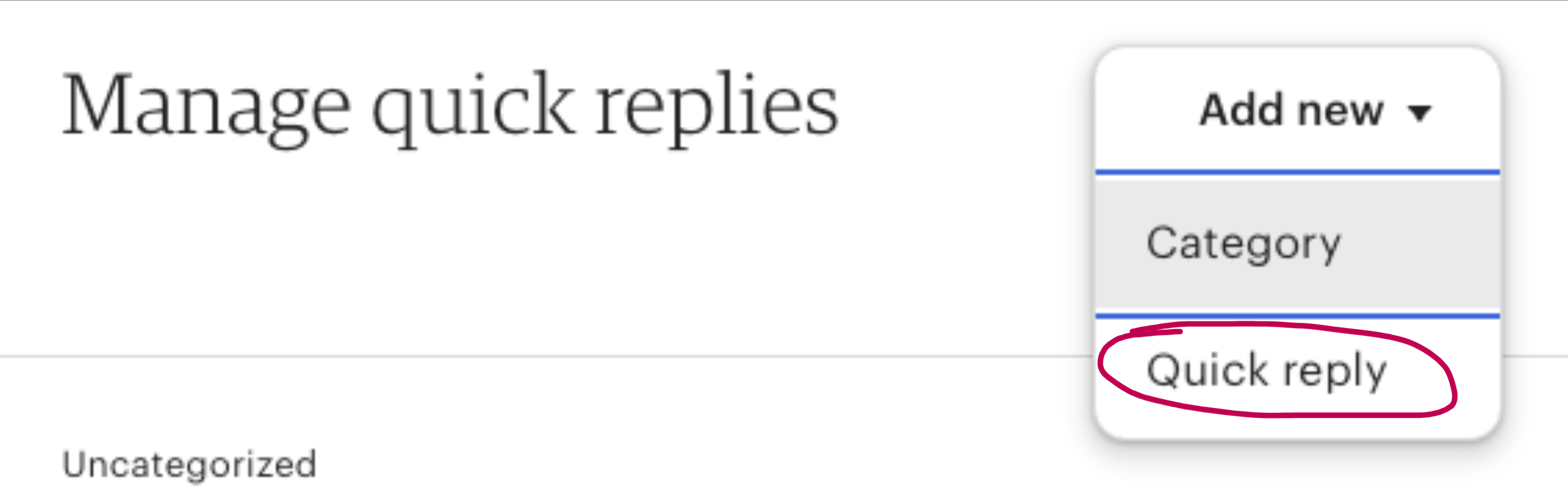
That will bring up the form where you can create your reply, name it, categorize it (optional), and save it.
Quick Replies Worth Creating
The list below shows the types of issues we have found come up frequently. Add any others as you come across them to save time later.
-
Lost packages/Where’s my item
-
Reminder: USPS only considers a package lost if there hasn't been an update in tracking for 14 days.
-
See page 25-26 in the Introduction to Podzilla slideshow for more info.
-
-
Can I get this by ___?
Normally we say at least 1½ weeks out but at Christmas we say "I won’t guarantee anything less than 2 weeks" to be on the safe side. -
When will my order ship?
Some people assume we are Amazon with same day service. You must point out that our production time generally runs 1-3 business days for most items or 2-5 business days for candles. This may slow down a bit at the peak, so adjust those times as needed in your reply. -
OPTIONAL - Sending mockups of personalization
-
If you have time to do this, customers really appreciate it and it shows up in positive reviews.
-
Give a deadline for the customer to reply by or the order will be sent to production as shown in the photo. Over half of customers never reply at all and probably only 5% request a change.
-
-
Make the deadline work for you and add processing time to your orders accordingly.
-
Sample message for the mockup quick reply:
Thank you so much for your order!
Here’s the mock-up photo of your personalization for your approval. If it looks good, we’ll get that order started right away.
You'll have until 9am Eastern time tomorrow [insert date here] to approve the personalization or request changes. After that time, the order will be processed as shown in the mockup photo and no changes can be made.
We will send you a tracking number as soon as your item is ready to ship!
Please allow 1-3 business days from the time an item is shipped for movement to show on your tracking number.
If you are happy with your item, we would love to receive your 5-star review! We pride ourselves in making sure our customers love their items! Please be sure to reach out to us directly if you have any questions or issues with your order BEFORE leaving your review if you feel your item deserves less than 5 stars, so we can help you if needed! Thank you so much for supporting our small family-run business! We appreciate you very much!
Please reach out if you have any questions or concerns.
Dealing with Odd Order Requests or Personalization
During Q4, you may get unusual order requests or customers who do not follow your personalization instructions. When this happens:
-
Send an initial message on Etsy with the issue. Set a deadline for a response or the order will be canceled. (24 hours or a certain time the following day is reasonable.)
-
Email the customer directly a few hours later to be sure they have the best chance of seeing your message. Include your deadline for response there, too.
-
If there’s no response from the buyer by the deadline, cancel the order and in the message include a note on why you’re canceling the order and maybe include a promo code for them to repurchase the item at 5% more than your shop sale. Also, note that it can take a few business days for the refund to show back up on the original payment method.
-
Pro Tip: Doing this fully refunds the buyer and prevents them from leaving a review.
-
Orders Made After the Deadline (Completely Optional
We have a couple more quick replies set up to send after the shipping deadline has passed. This is an optional step that may or may not be feasible, depending on how many orders you’re getting.
I sent a lot of these messages last year and I think only two people canceled. Most buyers appreciated the heads up, but said proceed with the order.
Many did not reply but I proceeded with orders as normal so there wouldn't be any further delays in order processing. I didn’t set deadlines in these messages for that reason.
Message for when the deadline is passed but delivery may still be possible.
Example - Your shop deadline is Dec.18.
Thank you so much for your order!
The deadline for guaranteed Christmas delivery has now passed. It’s still possible your order will arrive before Christmas, but if you're not ok with the possibility of it arriving after Christmas, please let me know ASAP and I will cancel and refund your order if it’s not already in production.
Message for when it’s not likely an order can be delivered by Christmas and you’re setting expectations.
Example - Dec. 19-21.
Thank you so much for your order!
The deadline for Christmas delivery has now passed. It’s not likely that your order will be delivered before Christmas. If you're not ok with it arriving after Christmas, please let me know ASAP and I will cancel and refund your order if it’s not already in production.
Potential Order Delays
Order delays happen for various reasons during the holidays. A couple of reminders if you have an orders that are delayed:
-
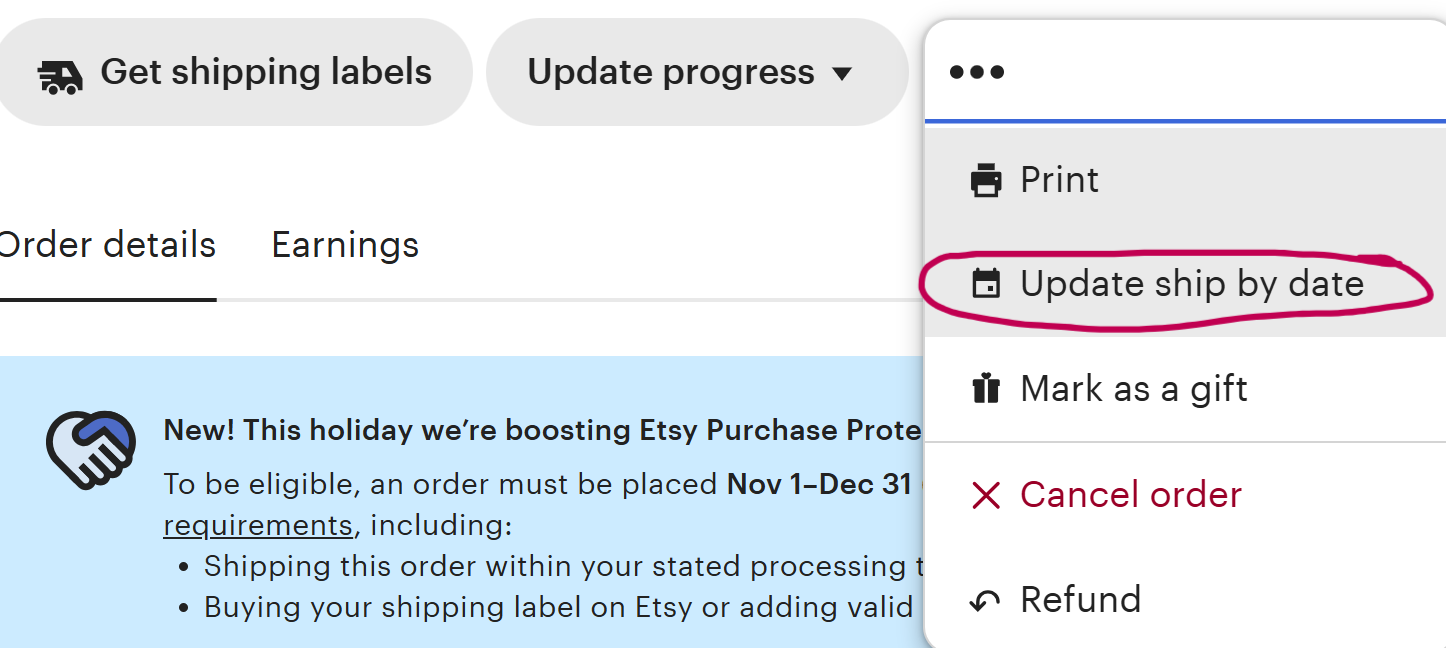
If you have orders approaching the ship by date on Etsy, remember you can extend the ship by date once to account for the delay, so be generous in the date you choose.
-
Note: If this keeps happening, then your processing window is too short. Go to Settings->Shipping Settings and edit your shipping profiles to add additional time to your processing.
-
ALSO: Check to make sure your processing schedule is set to Monday-Friday with no holidays selected.
-
-
Podzilla orders (like other production partners) are processed in a First In - First Out basis. Orders cannot be reprioritized if a seller doesn't approve orders in a timely manner.
-
APPROVE EARLY AND OFTEN! This will keep orders shipping smoothly for your shop this Q4.
-
-
Remember Podzilla tries hard not to send things out the door that don’t look good. This means some orders get reprinted without you knowing, so that can cause an order to go a day later than normal. Another reason to keep your processing times long enough to account for things like that.
Related
More Articles
Getting Started
Welcome to Podzilla! The Podzilla website lets you manage products and orders associated with your shop(s). Let’s get you started.
Apparel Deep Dive: Catalog, Templates, Products & Orders
This guide walks through everything you need to know about working with apparel in Podzilla — from browsing the catalog and using the print template, to setting up products, syncing SKUs, and approving orders. It's based on Valerie's comprehensive video tutorial above, which demonstrates each step on screen.
How to Use the Candle Design Template
TRANSCRIPTThis article explains how to use Podzilla’s candle design templates, including layout...
Saving Sales with Canva Photo Cards
This customer service option has saved many of my sales! It only takes a few minutes, and is well worth it. I've included the instructional video and my script. Be sure you modify it for your brand and voice.
How to Use the 20oz & 40oz Tumblers Design Templates
TRANSCRIPTThis article explains how to use Podzilla’s Canva and Photoshop design templates for ...