Using ChatGPT for Your Etsy Shop
Running an Etsy shop requires creativity, consistency, and time. But ChatGPT can act as a behind-the-scenes assistant, helping shop owners save time, improve listings, and communicate more effectively with customers. Here are some of the most valuable ways Etsy sellers can use ChatGPT.
- Customer service messages
- SEO
- Shop analysis
- Analyze sales data
- Come up with a double down action plan for your shop.
- Using trend reports
Customer Service
By now most of you probably already use ChatGPT to help write your customer service messages but if you haven't here are some ideas and tips to try.
- When a customer reaches out with an issue copy and paste their message into ChatGPT and ask it to write a reply in the tone you're looking for (professional, friendly, reassuring, casual, etc.) with the basics of what the reply should be.
- If you have an angry or rude customer you can vent that to ChatGPT and write out how you really feel and ask it to rewrite it into something you can actually send!
- Save these replies as Quick Replies on Etsy or keep them in a document on your computer so you can refer back to them later.
SEO
ChatGPT can also be used to help you craft great SEO in seconds. This includes coming up with product titles and descriptions with all of the best keywords sprinkled throughout. Members of Cassiy Johnson's POD Roadmap community have access to a great SEO chatbot but there are many ways to craft SEO using ChatGPT so find the method that works best for you.
You can also come up with your own prompt. It may take a few tries for it to give you properly formatted SEO based on your preferences like longer or shorter titles for example.
Regardless of the method you use, it is always best to use proven SEO whether you use SEO from bestsellers or use tools such as Everbee or ERank. SEO from ChatGPT is just a base to get you started, you will need to tweak and edit the results.
Example prompt if you upload mockup photos:
- "Give me a 140 character or less Etsy title in title case, an approximately 400 character product description in proper paragraph structure, and a comma separated list of 13 tags (each tag not exceeding 20 characters, this is very important) for these Comfort Colors shirts in a way that will maximize the listing's visibility and CTR on Etsy"
Shop Analysis
This is where the magic really happens. Did you know you can download your Etsy shop data and upload it to ChatGPT? Once you do that, you can do all sorts of useful things from analyzing sales to coming up with a listing plan for the next month, quarter, or year.
Downloading your data
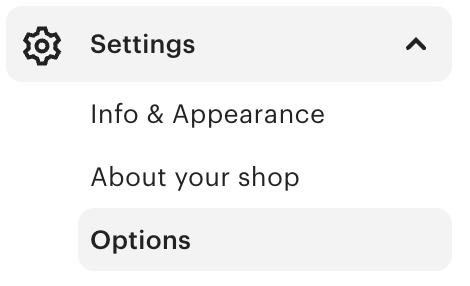
To find your Etsy shop data on the Etsy sidebar go to Settings then Options. Then at the top of the Options page find the Download Data tab.
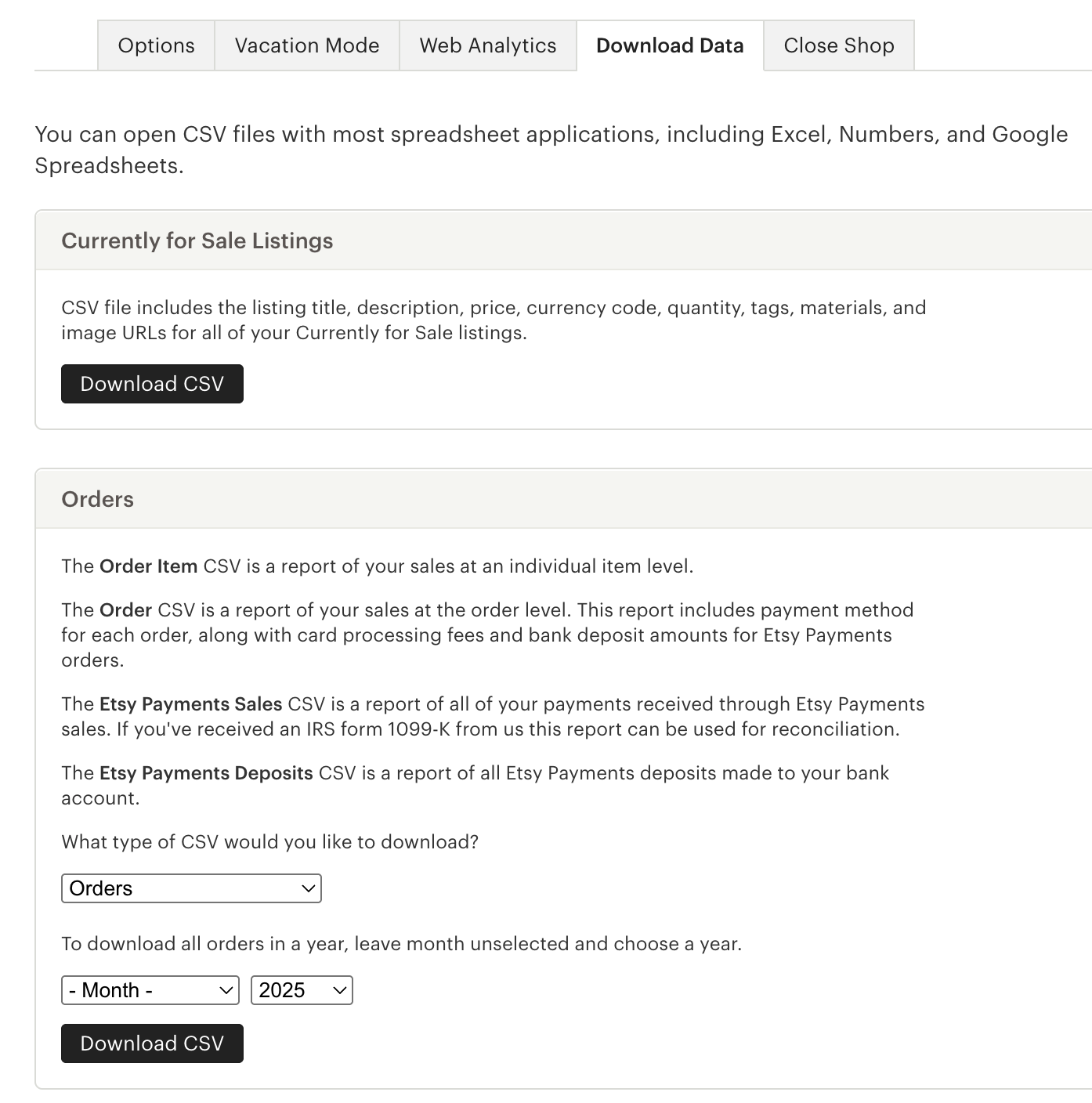
Then once you're on the Download Data page you will download your "Currently for Sale Listings" CSV file.
In the box below if you want to analyze your shop you will select Orders from the first dropdown and select the time period you want the data to cover. Selecting only the year will download data for that entire year. Download that CSV as well.
Now that you have your files you will upload them to ChatGPT and give it a prompt for the type of information you're looking for. But to find that perfect prompt you need to understand what it's looking at in order to do a shop analysis. And depending on your workflow you may have to give it some detailed instructions on what to include and exclude from the data.
What ChatGPT is doing when you upload those files is matching the order data SKUs to the current listing SKUs to read the SEO about the types of listings that are selling in your shop. If you want, you can go through the CSV files and edit them yourself to exclude what's needed so that it will give you the most accurate results but if you have a lot of listings this can be a time consuming process.
Scenario 1: All listings are SKU linked from the beginning
This will give you the most accurate data right away. So for this case an example prompts would be given this data from my Etsy shop:
- Analyze this data and give me an action plan to double down on the niches that are doing well in my shop.
- How can I turn successful niches into group listings?
- Which products should I focus on?
Scenario 2: Some listings are SKU linked
This will require a bit of effort in telling ChatGPT what to include and exclude when it analyzes data. For this you can still ask any of the things above but add conditions:
- Exclude any listings with no SKU numbers.
- If you use "placeholder SKUs" for listing variations like mugs you'll also need to ask it to exclude those types of SKUs.
- An example for using a placeholder SKUs would be a mug listing where one variation sells. But in Podzilla each mug type is its own product, so if you only add that one SKU to the listing Etsy will fill in that SKU for every variation if you have it set that SKUs vary. The result will be incorrectly linked products unless you fill in the SKUs for all other variations with a placeholder.
- Prompt Example:
Exclude any SKUs such as "11 oz black mug" and only use SKUs in an all numerical format or randomized strings of letters and number format such as "PROD-4hibBW-MG-BMWP-11" or "O53ZWAvlDDicQCQEPwyf"
- If you use a base SKU system give it examples of the format you use so it knows to include those as well.
Once you get the prompts right and it's reading the correct data you will be absolutely amazed by the results. You can even drill down further and ask for holiday specific plans for your niches, the possibilities are endless!
Using Trend Reports
Most Podzilla users are also members of either Cassiy Johnson's POD Roadmap or Shawna's Learn and Earn Academy (or both.) These ladies provide monthly trend reports that are a valuable resource in filling your shop with high quality trending designs. If you're looking for ways to get even more out of them here are a few ideas on ways to incorporate ChatGPT.
Once you have analyzed your shop, the trend reports are even easier to take action on because you can then give ChatGPT the trend reports and ask it for ways to combine the content of the trend report with niches in your shop.
Cassiy Johnson's Trend Reports
The easiest way to analyze her reports are to open the Canva document link from the Trend Report section of the POD Roadmap Discord and save that as a PDF file. Then upload the PDF along with a prompt. Cassiy shared these example prompts in the POD Roadmap Discord:
- Summarize this trend report for me. Highlight the top 5 trending niches, any major upcoming holidays or events to design for, and what design styles or product types are performing best right now
- Based on the trends in this report, create a 4-week Etsy listing plan for a print-on-demand seller. Include what types of designs or products to focus on each week, and how to mix holiday, seasonal, and evergreen items
Shawna's Trend Reports
Shawna releases a private YouTube video each month for members of her Learn and Earn Academy. You can't give ChatGPT the video link and have it analyze it so you will need to find the text transcript on the YouTube page and copy and paste the transcript into ChatGPT along with a prompt of what you would like it to analyze/summarize.
This has limitations since it's only reading text and not able to read the images she's showing in the video. But it can still give you great cross niche ideas and summarize the trending design styles she's mentioning in her video.
Related
More Articles
Getting Started
Welcome to Podzilla! The Podzilla website lets you manage products and orders associated with your shop(s). Let’s get you started.
Apparel Deep Dive: Catalog, Templates, Products & Orders
This guide walks through everything you need to know about working with apparel in Podzilla — from browsing the catalog and using the print template, to setting up products, syncing SKUs, and approving orders. It's based on Valerie's comprehensive video tutorial above, which demonstrates each step on screen.
How to Use the Candle Design Template
TRANSCRIPTThis article explains how to use Podzilla’s candle design templates, including layout...
Saving Sales with Canva Photo Cards
This customer service option has saved many of my sales! It only takes a few minutes, and is well worth it. I've included the instructional video and my script. Be sure you modify it for your brand and voice.
How to Use the 20oz & 40oz Tumblers Design Templates
TRANSCRIPTThis article explains how to use Podzilla’s Canva and Photoshop design templates for ...