Requesting a Reprint
You can request a reprint on any Podzilla order. Who pays for the reprint depends on the reason.
When the Seller Pays
The seller covers the cost if the issue is due to seller error or customer service, such as incorrect artwork, the wrong product being sent, or a goodwill reprint.
When Podzilla May Pay
Podzilla may cover reprints caused by production issues, such as printing defects or items arriving damaged. Photo proof is required, and approval should be obtained through support chat before submitting the reprint.
Important Reminder
If you submit a reprint before Podzilla approves coverage, you may be responsible for the cost if it does not qualify.
How to Get Help
Use the Podzilla chat bubble for the fastest support. Always include the order number and photos when applicable.
If there was an issue with your order, you can create a reprint order to have the item reprinted.
Who covers the reprint charges is based on the reason for the reprint.
- You are responsible for the cost if it was due to something on your end like an artwork issue (wrong personalization or image), buyer wanted a different size, etc.
- Podzilla will cover the cost of the reprint if the issue was on their part like printing issues or damaged items. They will require a photo of the issue.
- You must send a message through the support chat letting them know what the issue was and include the photo. Include the original order # in your message.
If you want Podzilla to cover the cost of the reprint, submit your issue in chat before requesting a reprint and get the all clear first that it will be covered. Regardless of the reason for the reprint it is up to you as the seller to initiate the reprint from your Podzilla Orders page.
If an order has been shipped and you need to have something from that order reprinted, open the order by searching the Etsy order # on your Podzilla orders and click the Request Reprint button.

Choose the item on the order that you want reprinted and select a reason for the reprint.
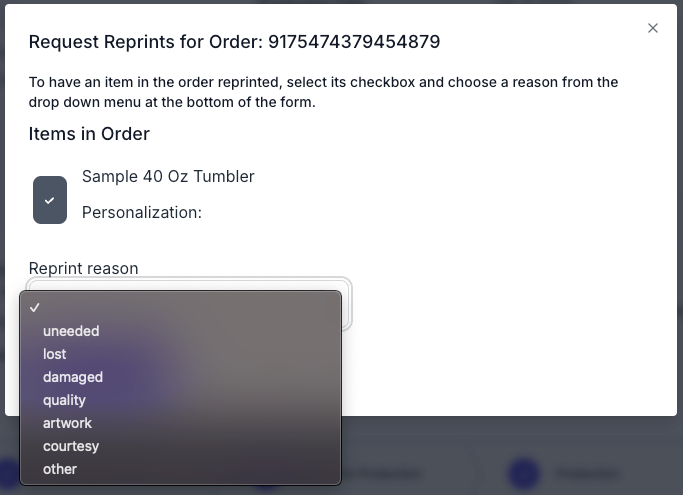
Requesting a reprint will create a new order on your orders tab. You can upload new artwork or change shipping details as you would for a normal order.
Remember to approve the order once you have everything ready to send to production.
Link to slideshow from video: Introduction to Podzilla
This article explains how reprints work in Podzilla, including when to request a reprint, who pays for it depending on the situation, how to contact Podzilla support, and how to handle common customer service issues such as damaged or missing packages.
Key Takeaways
-
Who pays for a reprint depends on the reason for the reprint
-
Podzilla approval should be obtained before submitting a reprint they are expected to cover
-
Reprints duplicate the original order and can be edited before approval
-
Etsy Purchase Protection may cover lost packages without financial loss to the seller
Who Pays for a Reprint
Seller-Paid Reprints
The seller is responsible for the cost when the reprint is related to seller error or customer service decisions, including:
-
Incorrect artwork uploaded
-
Wrong product linked
-
Incorrect item sent
-
Reprints done solely to keep a customer satisfied
Sellers may submit a reprint for any order at any time. A reprint duplicates the original order and allows edits before approval, just like a standard order.
Podzilla-Paid Reprints
Podzilla may cover the cost of a reprint when the issue is on their side, such as:
-
Printing defects
-
Items arriving damaged or broken
Requirements:
-
Photo proof must be provided
-
Podzilla must validate the issue
Best practice is to contact Podzilla via chat with the order number, issue details, and photos before submitting the reprint.
Submitting a Reprint Before Approval
If a reprint is submitted before Podzilla approves coverage, the seller may be responsible for the cost if the issue does not qualify.
For this reason, Podzilla prefers sellers to obtain approval through support chat before submitting a reprint.
Using Podzilla Support Chat
The support chat bubble in the bottom corner of the Podzilla dashboard is the fastest way to get assistance.
Best practices:
-
Always include the order number
-
Include both the original order number and the reprint order number when applicable
-
Upload photos directly in the chat when required
-
The chat may display “offline,” but messages still notify support
A red dot on the chat icon indicates a response has been received.
Step-by-Step Instructions
How to Request a Reprint
-
Locate the original order in Podzilla
-
Click “Request Reprint”
-
Select the item or items to reprint
-
Choose a reason (for reference only)
-
Submit to create a new reprint order
Selecting a reason does not automatically trigger billing credits. Billing approval is handled through support chat.
Editing a Reprint Order
Updating the Shipping Address
Use the “Update Shipping” button to correct an address.
If an item is returned to Podzilla due to an address issue, the seller is typically only charged for reshipping the item.
Replacing Artwork
If the artwork was incorrect:
-
Click “Replace Print File”
-
Upload the correct artwork
-
Save changes
-
Approve the order
Linking a Different Product
If the wrong product was sent:
-
Confirm the correct product exists in your Podzilla product catalog
-
Click “Link New Product”
-
Select and link the correct product
If product linking fails, contact Podzilla support via chat for assistance.
Miscellaneous Notes and Best Practices
Handling Missing Packages
USPS considers a package lost after 14 days, which may not be reasonable during peak seasons.
Recommended steps:
-
Confirm the shipping address with the buyer
-
If marked delivered, ask the buyer to check with neighbors
-
After 7 days, file a Missing Mail Search on usps.com
-
Communicate regularly with the buyer and provide reassurance
Etsy Purchase Protection
For confirmed lost packages:
-
The buyer submits a help request
-
After 48 hours, the buyer may open a case
-
Etsy refunds the buyer
-
The seller keeps the sale funds
This allows buyers to be refunded without financial loss to the seller.
Final Notes
Some sellers may choose to cover reprints even after refunds have been issued as a customer service decision. This is optional and based on individual business practices.
Related
More Articles
Getting Started
Welcome to Podzilla! The Podzilla website lets you manage products and orders associated with your shop(s). Let’s get you started.
Apparel Deep Dive: Catalog, Templates, Products & Orders
This guide walks through everything you need to know about working with apparel in Podzilla — from browsing the catalog and using the print template, to setting up products, syncing SKUs, and approving orders. It's based on Valerie's comprehensive video tutorial above, which demonstrates each step on screen.
How to Use the Candle Design Template
TRANSCRIPTThis article explains how to use Podzilla’s candle design templates, including layout...
Saving Sales with Canva Photo Cards
This customer service option has saved many of my sales! It only takes a few minutes, and is well worth it. I've included the instructional video and my script. Be sure you modify it for your brand and voice.
How to Use the 20oz & 40oz Tumblers Design Templates
TRANSCRIPTThis article explains how to use Podzilla’s Canva and Photoshop design templates for ...